

AI paid media monitoring tools watch your campaigns around the clock, flag problems like overspend or creative fatigue, and prepare fixes, but a person approves any change that touches budget, targeting or what goes live. The useful ones are defined by where that approval gate sits, not by how many metrics they track. This guide covers what to monitor, which actions need sign-off, and how to set up an ad change approval workflow that doesn’t slow your team down.
What does AI paid media monitoring actually do?
AI paid media monitoring is the continuous checking of live ad accounts against rules and baselines you set, with alerts and proposed actions when something drifts.
In practice, a monitoring tool or agent connects to platforms such as Meta Ads and Google Ads, plus your analytics (usually GA4), and looks for a short list of signals:
- Spend pacing against the daily or monthly limit
- Sudden changes in cost per result, click-through rate or conversion rate
- Creative fatigue: frequency climbing while engagement drops on the same ad
- Disapproved ads, paused campaigns or broken tracking
- Budget concentrated in ad sets that stopped converting
The monitoring part is cheap and safe to automate. Reading data changes nothing in the account. The risk starts when the tool moves from reporting to acting.
Why do AI ads monitoring tools need human approval?
Because paid media is the one marketing channel where a wrong automated action spends real money immediately.
An email draft that misses the brand voice can be fixed before send. A budget increase applied to the wrong campaign is spent by the time anyone notices. The same goes for audience changes that push ads to the wrong market, or a new creative that makes a claim legal never cleared.
Human approval for AI ads exists to separate two kinds of work:
- Reversible, low-stakes work the agent can own: pulling reports, labeling fatigued creatives, drafting new ad variants, preparing a change list
- Spend and brand decisions that stay with a person: raising budgets, launching new campaigns, changing targeting, publishing new claims
Most teams that skip this split do so because the tool makes approvals awkward, not because they trust the automation. If approving a change takes five clicks in a separate dashboard, people stop checking. For a longer argument on this, see our guide on why an AI ads manager should not launch campaigns alone.
Which ad changes should require approval?
Any change that increases spend, changes who sees the ad, or changes what the ad says should go through an approval gate. Pausing something that is clearly broken usually should not.
A simple tiering works for most accounts:
| Change type | Example | Who decides |
|---|---|---|
| Read only | Daily performance summary, anomaly alert | Agent, no approval |
| Protective | Pause an ad with a broken landing page | Agent acts, then notifies |
| Bounded optimization | Shift budget between ad sets within the existing total | Agent proposes, person approves |
| Spend increase | Raise a campaign budget or the account limit | Person decides |
| New exposure | New campaign, new audience, new market | Person decides |
| New message | New creative, new offer, new claim | Person approves copy and visuals |
The exact thresholds vary by account. A brand spending a few hundred dollars a day can let the agent shift more on its own than one with a large monthly budget. Write the thresholds down before the agent connects to the account, not after the first surprise.
How does an ad change approval workflow work?
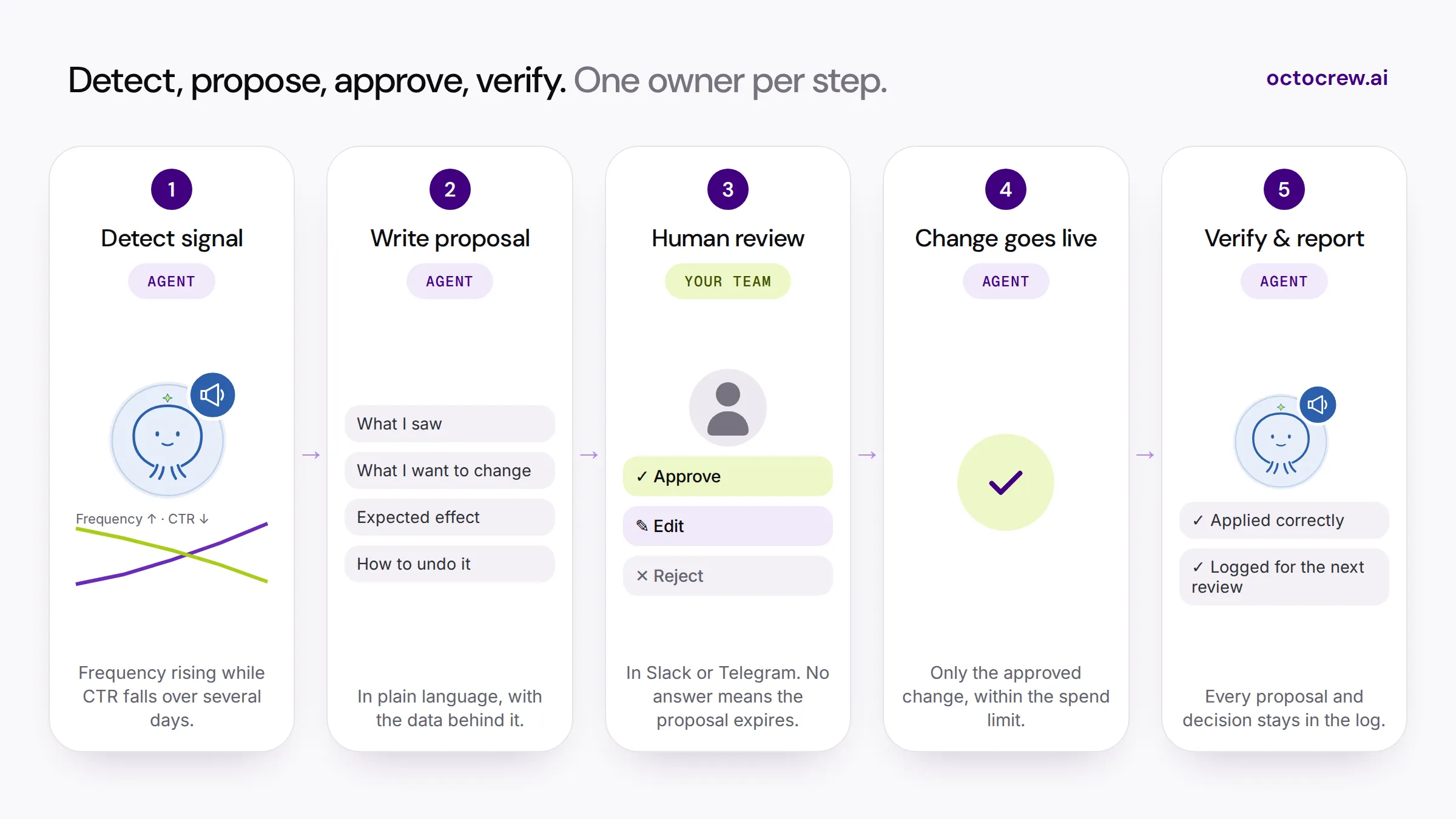
A working ad change approval workflow has four steps: detect, propose, approve, verify. Each step has a clear owner.
The agent detects a signal, such as frequency rising on a top ad set while click-through rate falls over several days. It then writes a proposal in plain language: what it saw, what it wants to change, the expected effect and how to undo it. A named person approves, edits or rejects the proposal, ideally in the place the team already works, like Slack or Telegram. After the change goes live, the agent checks that it applied correctly and reports the result on the next review cycle.
Three details decide whether this workflow holds up:
- One approver per decision type. Budget changes and creative changes often belong to different people.
- A default for silence. If nobody approves within a set window, the proposal expires. It never auto-applies.
- A written log. Every proposal, approval and rejection is kept, so the team can see why the account looks the way it does.
What should you look for in AI media buying oversight?
Good AI media buying oversight comes down to control over limits, visibility into reasoning, and where the approvals happen. Feature lists matter less than these.
Check each tool against these questions:
- Spend limits: Can you set a hard cap the agent cannot exceed, per campaign and per account?
- Action scope: Can you choose which actions run on their own and which need approval?
- Explanations: Does every proposed change state the data it is based on?
- Approval location: Do approvals happen where your team already works, or in yet another dashboard?
- Context: Does the tool know your brand rules, offers and past decisions, or does it need rebriefing each time?
- Reversibility: Is there a clear record of what changed, so a person can undo it?
- Maintenance: Who updates the rules when platforms change, your team or the vendor?
The last question is easy to miss. A self-serve tool puts rule maintenance on your team. A managed service puts it on the vendor. Neither is wrong, but you should know which one you’re buying. Our comparison of managed agents and DIY automation covers that trade-off in more detail.
How does Octocrew handle paid media monitoring with approval gates?
Octocrew runs paid media as a managed AI Paid Media agent that works inside your existing ad platforms and team chat, within spend limits you define.
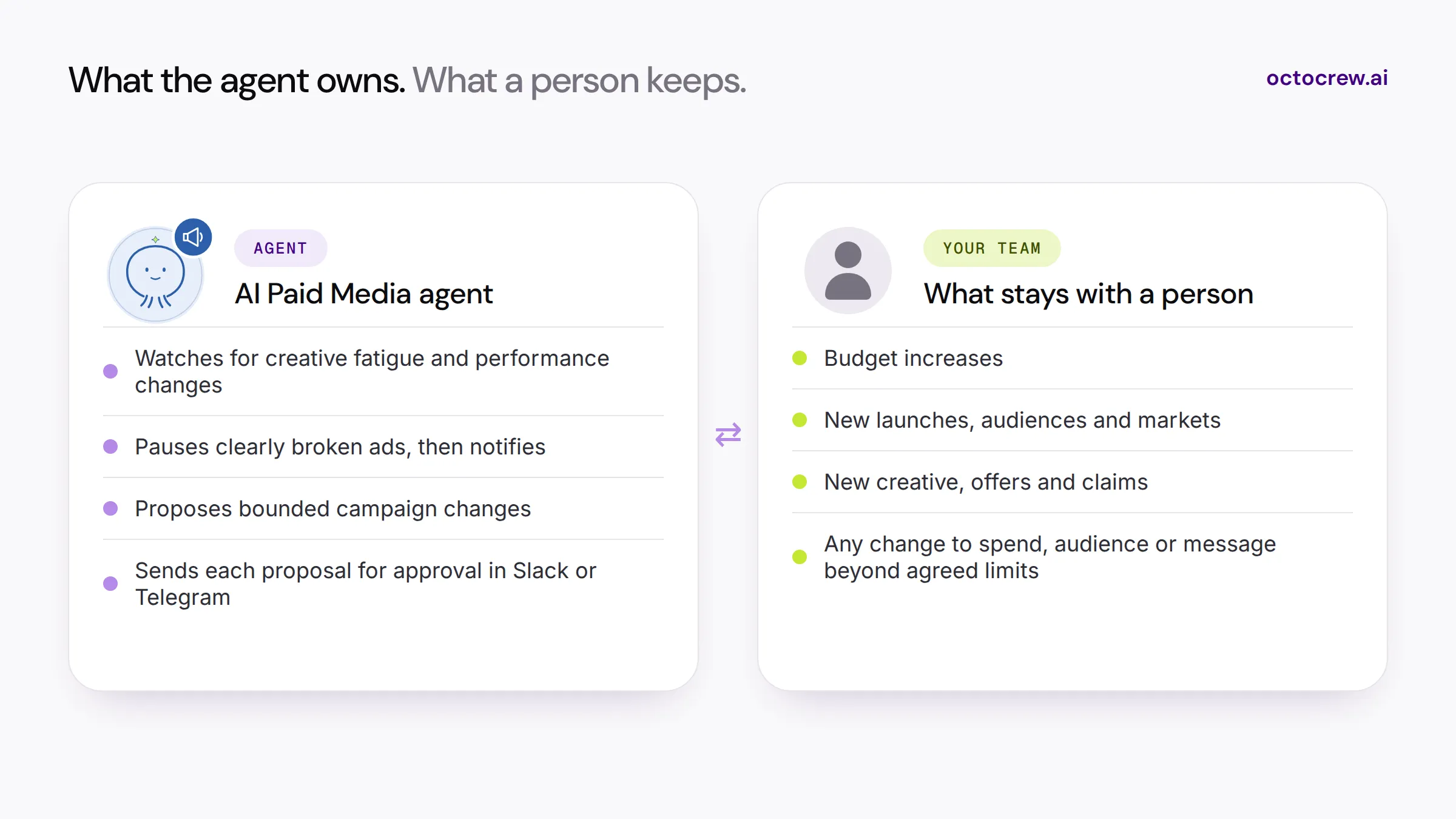
The Octocrew Paid Media Agent for AI paid media monitoring monitors and improves campaigns on Meta Ads, and on Google Ads after a fit check. It watches for creative fatigue and performance changes, proposes bounded campaign changes, and sends them for approval in Slack or Telegram. What stays with a person: budget increases, new launches, and anything that changes spend, audience or message beyond the agreed limits.
A few things make this different from a standalone monitoring dashboard:
- Shared company brain. Brand context, corrections and performance insights are shared across Octocrew’s agents, so the AI Paid Media agent works from the same brand rules as the AI email marketing agent and the AI SMM agent.
- Managed setup. Implementation, onboarding, calibration and maintenance are included in the subscription. Your team sets the limits and approves; Octocrew keeps the workflow running.
- Start small. You can begin with the AI Paid Media agent alone and add other roles once the workflow proves reliable.
The AI Paid Media agent costs $1,000 per month. That is worth comparing with your current agency retainer or the time an in-house marketer spends on daily account checks. If your team already checks the account every morning and rarely misses anything, a simpler rules-based alert in the ad platform may be enough.
FAQ
Can AI paid media monitoring run without any human approval?
It can, but it shouldn’t for spend or audience changes. Read-only monitoring and alerts are safe to run unattended because they change nothing in the account. Protective actions, like pausing an ad with a broken link, are usually fine with notification after the fact. Anything that raises spend, adds new exposure or publishes new creative should wait for a named person to approve it.
How fast should approvals happen?
Fast enough that the data behind the proposal is still current. For most accounts, that means approvals are reviewed within the same working day. Set an expiry window for each proposal, so stale changes don’t apply after conditions have moved. Putting approvals in Slack or Telegram, where the approver already works, does more for speed than any other setting.
Do AI ads monitoring tools replace a media buyer?
No. They take over the repetitive part of the job: checking pacing, spotting fatigue, preparing change lists and reports. Strategy, budget allocation across channels, offer decisions and creative direction stay with a person. For small teams, the gain is that one marketer can oversee more accounts or channels without doing every daily check by hand.
What is creative fatigue detection?
Creative fatigue detection flags ads whose performance is declining because the same audience has seen them too often. The usual signal is frequency rising while click-through rate or conversion rate falls on the same ad. A monitoring agent can flag the ad and draft replacement variants, while a person approves the new creative before it runs.
Next step
Pick the three changes your team worries about most, write down who approves each one, and set the spend limit before any tool touches the account. If you want a managed agent to run the monitoring and proposals inside those limits, see how Octocrew sets up the AI Paid Media agent.